Our Blog
6 Best Computer Printers for Home Use in UAE in 2026
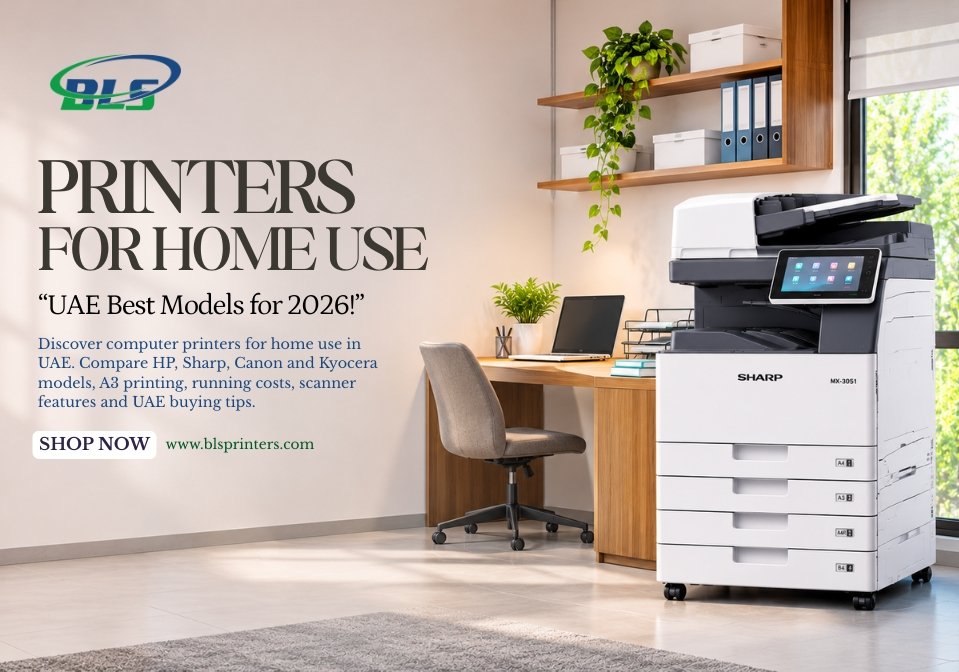
The selection of an ideal printer for your home is hard because various types of printers have different capabilities, printing speeds, and costs. Students need printers to type their projects, and families print photographs and other academic projects, and the professionals do their reports. Finding suitable computer printers for home use requires understanding your printing requirements, available space, and budget.
Some people require a small printer for limited use whereas other people need printers that can print in color, scan, and accept large-size paper. The best printer for home use should make everyday printing convenient without creating unnecessary expenses. This guide explores six models from the BLS Printers product list, along with their features, limitations, and suitable applications.
What to Remember
- Select a printer according to your print volume and the type of documents you need to print.
- Laser printers are ideal for heavy-duty documents, whereas inkjets allow for creative printing.
- Multifunction printers provide printing, scanning, and copying facilities.
- Large format and A3 printers are suitable for specialty work.
- Check for warranties, toner prices, and UAE support.
This printer is ideal because it serves your requirements without adding any extra functionality or cost.
Important Things to Consider Before Buying a Home Printer
While selecting computer printers for home use, first take into account the frequency of your printing and the nature of documents that you need to print. You can go for cheap color printers if you are a student, but home-based professionals would prefer faster multifunction printers.
Important features to compare include:
- Print Quality: Sharp text and suitable colour output for documents and projects.
- Printing Speed: Faster printing for regular assignments and office paperwork.
- Wireless Connectivity: Convenient printing from compatible laptops and smartphones.
- Scanning and Copying: Useful for school records, forms, and business documents.
- Running Costs: Toner, ink, paper, and maintenance expenses.
- Printer Size: Enough space for installation and paper handling.
A good choice for the best house printer would be one which has practical attributes that correspond to your rate of printing.
Best Computer Printers for Home Use – Top 6 Recommendations
Below are some printer models that have been selected from the product line-up of BLS Printers. The printers selected below have color printing capabilities, document processing, A3 printing, and large format printing capabilities. The selection of these printers is not based on any ranking but on their use.
Find the Best Printer for Your Home in UAE
Looking for a reliable printer for home use, online classes, office work, or everyday document printing? BLS Printers can help you explore suitable printer options based on your printing needs, budget, and preferred features. Contact us to find the right printer for your home.
1. HP Color LaserJet Pro MFP M283fdw – Best Overall Home Office Printer
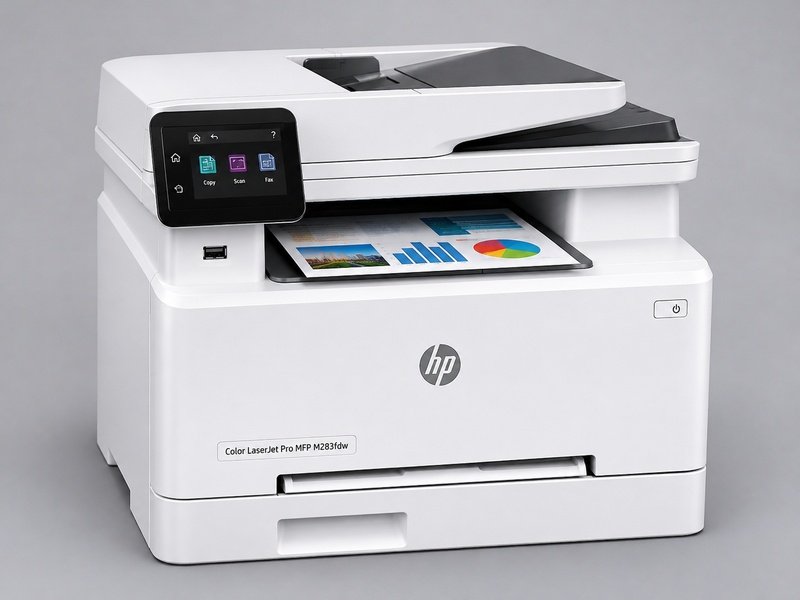
The HP Color LaserJet Pro MFP M283fdw is appropriate for homes that are always involved in printing documents and coloured material. The multifunction laser printer can carry out activities such as printing, scanning, copying, and sending faxes. It is especially helpful for people who do their work from home.
Key Features
- Colour laser printing
- Printing, scanning, copying, and faxing
- Wireless printing support
- Automatic double-sided printing
- Automatic document feeder
Limitations: Replacing color toner cartridges increases the cost of operation. It also becomes more difficult to use than an inkjet printer specifically designed for photography prints.
Why It’s a Good Fit: It is a practical best home printer scanner candidate for professionals and families who need regular colour documents, scanning, and copying.
2. Sharp BP-20C20 – Best Compact A3 Colour Multifunction Printer
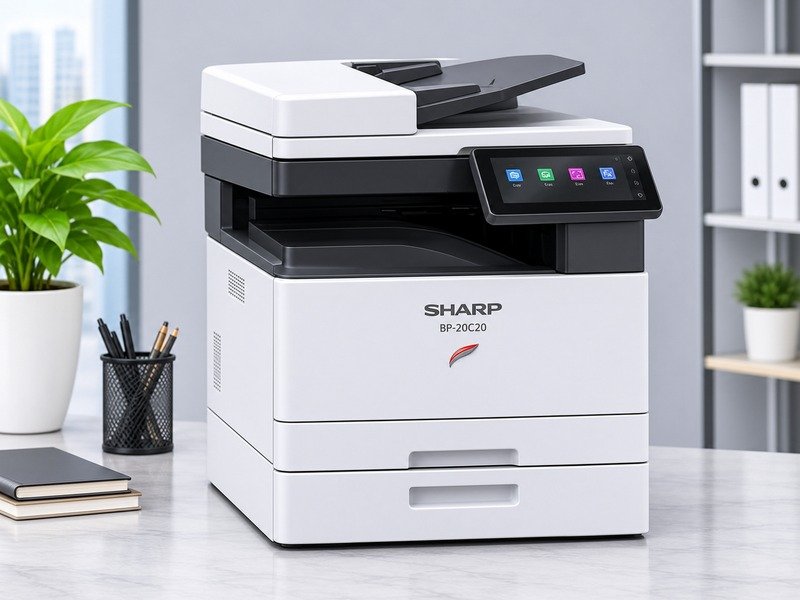
The Sharp BP-20C20 multifunction color printer is suited to an environment that requires printing documents only. The printer is capable of printing, copying, and scanning. The printer’s ability to print on A3 paper size may assist the user in printing some documents.
Key Features
- Colour document printing
- Printing, copying, and scanning
- A3 paper support
- Network printing capabilities
- Multifunction document handling
Limitations: Though small for a machine in this class, it is bigger than an average desktop printer. Purchasers are advised to check the available space for setting up the machine before buying.
Why It’s a Good Fit: It suits home-based professionals who need colour printing and occasional A3 documents without using separate office machines.
3. Konica Minolta Bizhub C3351i – Best Printer for Frequent A4 Documents
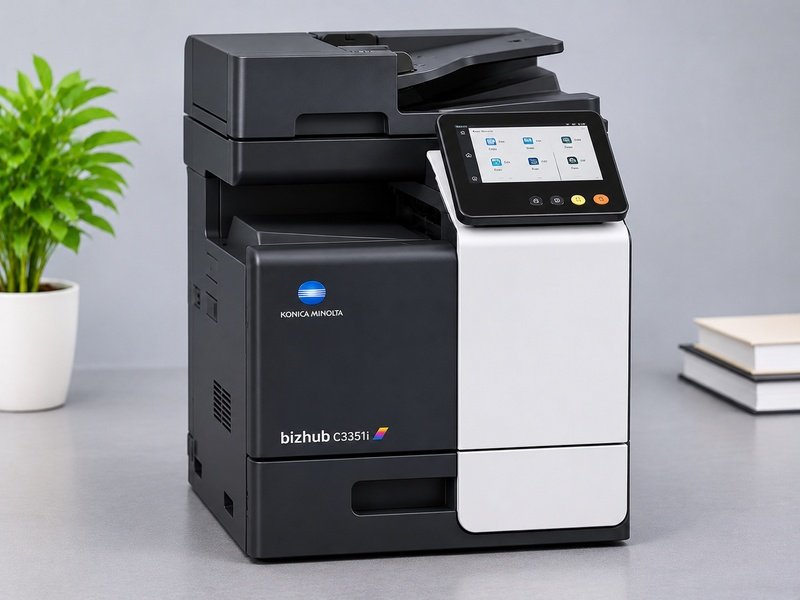
The Konica Minolta Bizhub C3351i printer is ideal for professionals who deal with everyday paperwork at their homes. It has colour printing, scanning, and copying functions tailored to office use. The fact that it is A4-oriented enables its usage in situations where one does not need A3 printing.
Key Features
- A4 colour printing
- Multifunction printing, scanning, and copying
- Automatic document feeding
- Network connectivity
- Office document management features
Limitations: It is an improvement from regular home printers, which might have high costs of maintenance and equipment. Infrequent users need not worry about its extra features.
Why It’s a Good Fit: For professionals searching for the best fast printer for regular A4 paperwork, this model is worth comparing against other office-focused options.
4. Canon imageRUNNER ADVANCE C3326i – Best Advanced Home Office Printer
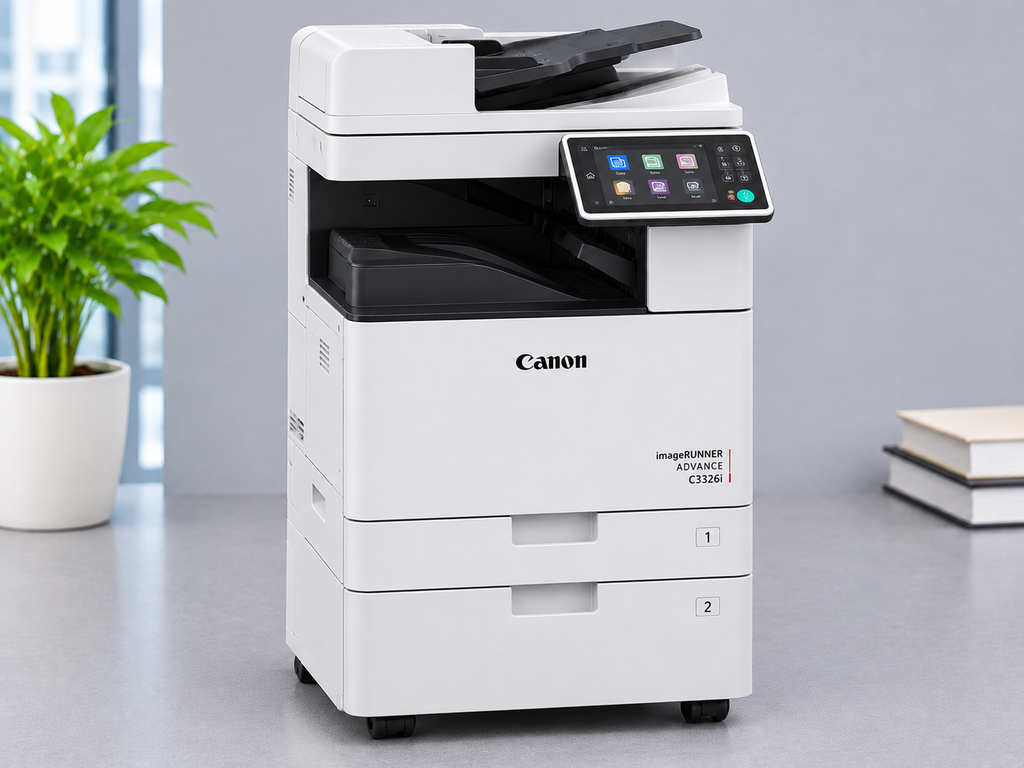
The Canon imageRUNNER ADVANCE C3326i can be used for printing color documents on an everyday basis. This machine provides multifunction and A3-size printing. Thus, it will be appropriate for larger home offices. Those users who deal with presentations, reports, and business documents will find its functionality useful.
Key Features
- Colour laser multifunction printing
- A3 and A4 document support
- Scanning and copying
- Network connectivity
- Automatic double-sided printing
Limitations: It requires additional installation space compared to regular home printers. The office-type functionality of the printer may be redundant for home usage.
Why It’s a Good Fit: It is suitable for professionals who need regular colour printing, scanning, and larger business documents.
5. Kyocera ECOSYS M8124cidn – Best A3 Multifunction Printer
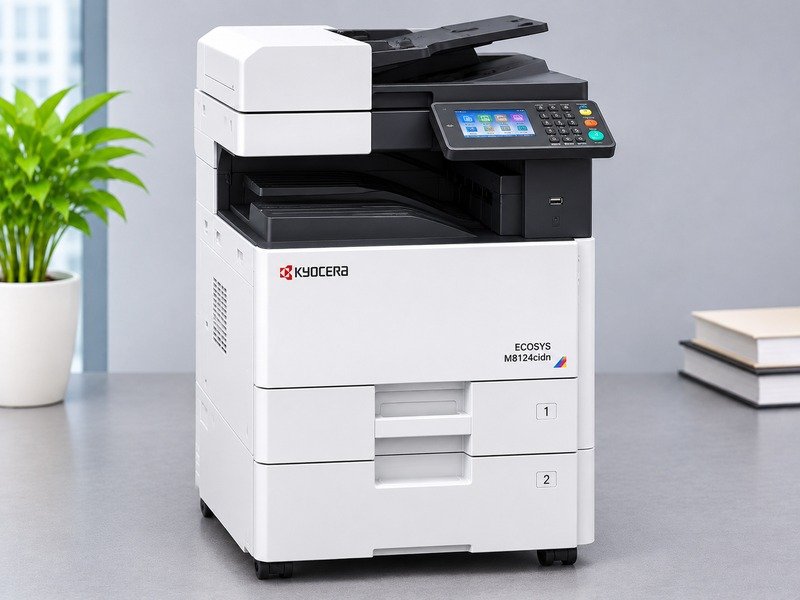
The Kyocera ECOSYS M8124cidn is appropriate for individuals requiring A3 color documents along with regular A4 printing needs. The device offers functionalities such as printing, scanning, and copying and can therefore be useful for work related to designs as well as business documents.
Key Features
- A3 colour printing
- Multifunction printing, scanning, and copying
- Automatic double-sided printing
- Network connectivity
- Document feeder support
Limitations: It is bigger than most home printers and designed for more professional usage. Consumers must consider the space needed and the future cost of supplies.
Why It’s a Good Fit: It is a useful a3 printer scanner option for designers and home-based professionals who regularly handle larger documents.
6. HP DesignJet T630 (36-inch) – Best Large-Format Printer for Creative Work
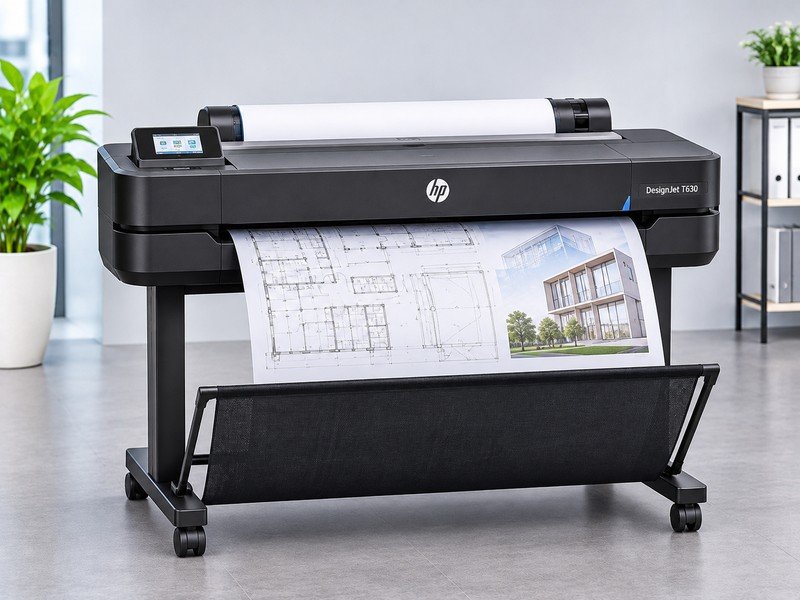
This printer, HP Designjet T630, is not a good choice for household work because it is intended to print large formats, which are not used in ordinary documents. It would be good for printing architectural or technical drawings and other wide formats of documents.
Key Features
- 36-inch wide-format printing
- Large technical drawings and plans
- Colour inkjet printing
- Wireless and network connectivity
- Support for roll-fed media
Limitations: It is not a multifunction printer, nor does it offer any function of scanning or copying on a daily basis. The size and expense of its specialist printing make it inappropriate for most users.
Why It’s a Good Fit: It is suitable for architects, designers, and creative professionals who require large-format printing at home.
Quick Comparison of the Best Home Printers
| Printer Model | Best For | Main Limitation |
|---|---|---|
| HP M283fdw | Everyday colour documents | Colour toner expenses |
| Sharp BP-20C20 | Colour printing and A3 tasks | Larger than desktop printers |
| Konica Minolta C3351i | Frequent A4 office work | Advanced equipment costs |
| Canon C3326i | Advanced home-office use | Requires installation space |
| Kyocera M8124cidn | A3 multifunction printing | Office-sized equipment |
| HP DesignJet T630 | Large technical drawings | No scanning or copying |
The best printer will vary from one’s need of printing to another, not just based on the cost of purchasing the device. A small, multifunction printer might be suitable for general printing, whereas something like A3 might be a better choice for specialized printing. Comparing equipment features and replacement expenses helps identify the best value printer for your household.
Inkjet, Laser and Multifunction Printers Explained
Selecting inkjet, laser and multifunction printers depends upon usage frequency, document types, and budget constraints. There are specific strengths and weaknesses of all three printers.
- Inkjet Printers: Inkjet printers use ink as a liquid, and they can print color photographs, artwork, and school projects. People searching for the best inkjet for home use should consider photo quality, replacement ink costs and printing frequency. However, printheads may require cleaning after extended periods without use.
- Laser Printers: Laser printers are toner-based and are appropriate for clear text and normal printing tasks. These printers are usually efficient in handling jobs that involve large numbers of documents, although their colored counterparts are relatively expensive to buy and replace.
- Multifunction Printers: These incorporate printing, scanning, and copying, while some also include faxing capabilities. These devices are great for families and even professionals at home, but they do demand a bit more room and money to purchase initially.
The best inkjet printer for home use may suit creative tasks and photographs, whereas a laser multifunction printer, such as the HP Color LaserJet Pro MFP M283fdw, can be more practical for regular office documents.
Choose the Right Printer for Your Home
From printing school projects and documents to handling everyday home-office tasks, the right printer can make your work easier. Explore printer options with BLS Printers and find a model that matches your budget, printing volume, and space requirements in the UAE.
Choosing Printers for Documents, Photos and School Projects
Different printing needs require different types of printers. Students require a printer that is cost-effective to print colors for their projects, while families may desire a multi-tasking printer for forms, photos, and other personal documents. Telecommuters can make use of auto-document feed and two-sided printing capabilities.
When comparing the best quality printer, consider whether you need sharp text, accurate colour output, or detailed photographs. Though a color laser printer is effective when making presentations and normal graphics, the photo inkjet works better when creating images.
A3 vs A4 Printers for Home Use
Printer A4 is good for schoolwork, letters, forms, and other office tasks. It takes up less room than other printers and fulfills the needs of a common household. People printing normal documents do not necessarily require a bigger printer.
A3 printers are ideal for artwork, posters, architectural plans, and designs. An example of a printer that offers A3 printing capacity includes the Kyocera ECOSYS M8124cidn printer, while the HP DesignJet T630 printer offers support for much larger printing needs. It is important to verify scanning sizes apart from printing sizes.
Affordable Home Printers and Long-Term Printing Costs
The best cheap printer for home use is not necessarily the model with the lowest purchase price. Ink, toner, paper, servicing and replacement components contribute to the total cost of ownership. A printer that is regularly used can make an expensive purchase more than worthwhile when considering operational costs.
Before purchasing computer printers for home use, compare estimated page yields, cartridge prices and maintenance requirements. For example, a printer costing AED 400 with a printing cost of AED 0.30 per page would cost approximately AED 1,300 after 3,000 pages. Another costing AED 700 with a printing cost of AED 0.10 per page would cost approximately AED 1,000 for the same volume.
These figures are illustrative and exclude paper and servicing costs.
For infrequent printing, the simple desktop printer could prove to be more cost-effective than the bigger multifunction printer at the office. The best value printer is one which finds a good balance between cost of purchasing, print frequency, and cost incurred over a period of time.
Make Home Printing Simple and Affordable
Need a printer for personal use, studies, or working from home? Choosing an efficient printer can help you manage daily printing without unnecessary expenses. Get in touch with BLS Printers to explore suitable printers, printing features, and consumable options available in the UAE.
Buying Home Printers in the UAE
When choosing the best printer for home use in UAE, customers should check product availability, warranty coverage, supplier reputation and after-sales support. The best home printer should match everyday printing needs while offering convenient access to compatible ink, toner and replacement parts.
Buyers interested in obtaining a best quality printer must also evaluate their printing capabilities and warranty conditions. Buyers must ensure that the price offered does not include VAT charges, transportation and installation costs. Customers can explore BLS Printers’ printers on sale and read about printing machine deals to compare suitable equipment and make an informed purchase.
Home Printer Maintenance and Running Costs
Routine maintenance is important for maintaining print quality and avoiding unnecessary costs in repairs. Individuals who use printers at home must maintain their printers properly, use papers in the right way, and replace ink or toner cartridges when necessary. Inkjet printers might be cleaned, while toners have to be replaced on laser printers.
Following manufacturer recommendations and using suitable consumables can help reduce printing problems. Customers looking for toner suppliers in Dubai can explore ink and toner options through BLS Printers.
Printer Spare Parts and Replacement Considerations
With age, problems can arise with the way paper is fed through the printer, the quality of the prints, and wear and tear. Prior to buying a new printer, consumers must evaluate the cost of repairs against the condition of the printer.
BLS Printers provides information about printer spare parts for supported equipment. Home-office users managing larger multifunction machines can also explore the guide on upgrading an office copier to understand when replacing older equipment may be more practical than continuing repairs.
Choosing the Right Printer for Everyday Needs
Selecting computer printers for home use requires balancing print quality, printing frequency, available space, and long-term costs. Students and families may benefit from compact multifunction printers for assignments, photographs, and everyday documents.
These professionals might require a printer with higher speed, wireless functionality, scanning capabilities, or even A3 printing. Comparing the important features, cost of consumables, and maintenance needs will help consumers make an informed choice.
Explore Home Printing Solutions With BLS Printers
At BLS Printers, customers in Dubai and Abu Dhabi can explore printer sales, toner supplies, spare parts, and maintenance support. Whether you need computer printers for home use for everyday documents, a dedicated home office, or specialist A3 printing, our team can help you compare suitable equipment. Contact us to discuss your printing requirements and available options.
1. What is the best printer for home use?
The HP Color LaserJet Pro MFP M283fdw is an appropriate choice for color printing documents and multifunctional activities in the office environment.
2. Which printer is good for home use?
A small laser printer or multifunction printer is usually ideal for routine printing, scanning, and copying.
3. Which printer is suitable for students?
Students must take into account cost-effective printing, the need for colour, and whether or not to scan.
4. Are laser printers suitable for home use?
Absolutely. Laser printers are good for textual printing and don’t suffer from the problem of printhead clogging.
5. Which printer is best for colour printing?
The HP M283fdw and Sharp BP-20C20 printers are examples of colour document printers.
6. Do home users need multifunction printers?
They can be employed while scanning and making copies along with printing.
7. Is an A3 printer necessary for home use?
Not usually. A3 printers are better suited for large pages, paintings, and business printing jobs.
8. Which printer is suitable for home-office work?
Konica Minolta Bizhub C3351i can be used for regular A4 office documents.
9. What should UAE buyers check before purchasing?
Ensure the availability of the product, warranty details, expenses for its use, installation details, and after-sales service.
10. Where can customers explore printer options in the UAE?
Customers should talk to BLS Printers to get the right kind of printers and their availability.
Latest Blog
-
 Best Printer for Renters in UAE – Find the Right Printer for Your Business
-
 Best Printer for Small Business in UAE – Affordable Options That Deliver Quality
-
 Best Professional Printer Sale Abu Dhabi – A Practical Guide for Office Buyers
-
 Best Printer to Buy in UAE: 5 Smart Options for Home and Office
-
 Colour Multifunction Printer for Office: Choose the Right Machine for Your Team
-
 Best Commercial Printer Rental Abu Dhabi for Businesses Handling High-Volume Print Jobs
-
 Best Printer for Small Business When Every Print Job Impacts Your Profit
-
 Best Printers for Office or Home in UAE in 2026
-
 Xerox Machine Price in UAE: Best Models, Features and Buying Guide for 2026
-
 Printer maintenance service in Abu Dhabi On-Site Printer Service
-
 Printer Spare Parts in Abu Dhabi, Dubai, UAE
-
 Printer Shop In Abu Dhabi | Printers, Ink & Toner
-
 Top 10 Buying Checklist Office Printers for Sale in Abu Dhabi,Dubai,UAE
-
 Top 10 Best printer dealers in Abu Dhabi,UAE
-
 Printer Toners and Cartridges Suppliers in Abu Dhabi: Top Brands and Profiles
-
 Printer Rental Services in Abu Dhabi: 5 Things to Check Before Choosing
-
 Top Printer Solutions for Government Offices in Abu Dhabi 2026 Guide
-
 Printers for Office or Home in Abu Dhabi UAE | Shop Top Printers
-
 Printer Solutions for Events & Exhibitions in Abu Dhabi
-
 Best Multifunction Printers in 2026 for Offices in Abu Dhabi and UAE
-
 What to Check Before Choosing a Printer Dealer in the UAE
-
 Improve Your Business Printing with Quality Printer Sales in Abu Dhabi
-
 Printer For Sale In Abu Dhabi, Dubai, UAE New & Used
-
 Printer Repair Service for Common Printer Problems
-
 Best Printers in Abu Dhabi for Offices & Businesses
-
 Trusted Canon – Printer Supplier & Dealer in Abu Dhabi, Dubai, UAE
-
 What Are the Best Printers for UAE Offices in 2026
-
 Best Printers for Office or Home in UAE: Expert Picks for Abu Dhabi Buyers
-
 Buy All in One Printers Online for Home and Office Needs
-
 Best Canon Printer on Sale in Abu Dhabi and Dubai
-
 All-in-One Printer Price in UAE: Complete Buying Guide
-
 Inkjet Printers on Sale Abu Dhabi for Different Printing Needs .
-
 Best Printer for Home Use in UAE and Abu Dhabi: Buying Guide
-
 Best Office Printers for UAE Businesses and Top Choices
-
 Business Printer Rental for Flexible Office Printing
-
 Xerox Machine Price in UAE: Find the Right Option
-
 Commercial Printers for Rent to Support Business Growth
-
 Printer & Copier Spare Parts And Consumables in Dubai
-
 Printer Rental Cost: Look Beyond the Number on the Quote
-
 Printer Servicing & Repair for Reliable Business Printing | BLS
-
 Commercial Printer Rental for Flexible Workplace Printing
-
 Printer Maintenance Contract for Smarter Business Printing
-
 Printer Spare Parts Guide: Common Components, Uses, and Replacement Signs
-
 Top Reasons to Upgrade Your Office Copier in 2026
-
 Business Printer Rental Solutions for Expanding Office Operations
-
 Toner and Cartridge Supplies in Abu Dhabi: Complete Business Buying Guide
-
 Top 7 Benefits of Photocopy Machine Rental for Abu Dhabi Businesses
-
 10 Questions to Ask Before Choosing a Cartridge Supplier in Abu Dhabi
-
 Reliable Printer Maintenance Services for Business Printing in Abu Dhabi
-
 Photocopy Machine Rental Solutions for Efficient Business Printing